Our preliminary task showed us we had three elements to filming - planning, filming and editing. We believe we did this very well, and came up with a finished product we are proud of.
We created a basic storyboard for our task, which can be found on my previous blog post. We planned some script starters, and allowed the actors to 'ad-lib' the rest of the conversation, to make it seem more natural. This way, we were able to create something that was a lot less formal, and how we wanted it.
As explained before, we had some problems before shooting, so Naomi and I arranged the storyboard AROUND the actors, rather than the actors around the storyboard. Doing this, we created a better atmosphere whcih allowed us to move around the conversation when filming, and stopped us breaking it up and adding some tension.
The idea of the preliminary task was to display the knowledge and understanding of the three continuity principals which we had learned in the planning process of the course. We didn't manage to keep it continual throughout the filming, so we used the editing software to correct this.
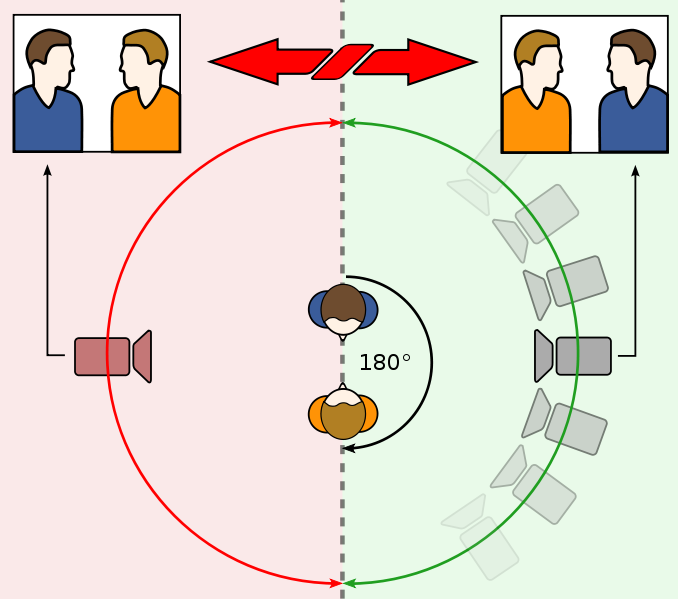
By flipping some of the 'over-the-shoulder' shots, we kept both the 180° Rule, and Shot-Reverse Shot. Match on Action was displayed in the man walking through the door.
In conclusion, we believe we can use the three rules we have displayed in our main task, and we plan to take on board what we have leanred, and try and make sure the difficulties we faced are overcome for the next task.
Showing posts with label Preliminary Task. Show all posts
Showing posts with label Preliminary Task. Show all posts
Sunday, 7 February 2010

Preliminary Task - Storyboard

We planned to have a man walk through a door, and show him coming through it and closing it. He then walks over to a table, where a woman is sitting. They talk, before the man walks out.
Unfortunately, on the day we had some difficulties filming, so we adapted our storyboard slightly, and decided to allow the two people to start a conversation, and we would move round them taking different shots. For this reason, the filming has continuity, whereas the sound and audio doesn't. We attempted to change this on the Mac, but unfortunately, we could not dub the sound over and keep the film the way we want it.
Monday, 30 November 2009
Preliminary Task - Storyboarding Terminology
CLOSE-UP SHOT - a close rangle of distance between the camera and the subject
DISSOLVE - a transition between two shots, where one shot fades away and simultaneously another shot fades in
FADE - a transition from a shot to black where the image gradually becomes darker is a fade out; from black where the image gradually becomes brighter is a fade in
HIGH CAMERA ANGLE - a camera angle which looks down on its subject making it look small, weak or unimportant
JUMP CUT - a rapid, jerky transition from one frame to the next, either disrupting the flow of time or movement within a scene or making an abrupt transition from one scene to another
LEVEL CAMERA ANGLE - a camera angle which is even with the subject; it may be used as a neutral shot
LONG SHOT - a long range of distance between the camera and the subject, often providing a broader range of the setting
LOW CAMERA ANGLE - a camera angle which looks up at its subject; it makes the subject seem important and powerful
PAN - a steady, sweeping movement from one point in a scene to another
POINT-OF-VIEW SHOT - a shot which is understood to be seen from the point of view of a character within the scene
REACTION SHOT - either a shot of someone looking off screen or as a shot of someone in a conversation where they are not given a line of dialogue but are just listening to the other person speak
TILT - using a camera on a tripod, the camera moves up or down to follow the action
ZOOM - use of the camera lens to move closely towards the subject
DISSOLVE - a transition between two shots, where one shot fades away and simultaneously another shot fades in
FADE - a transition from a shot to black where the image gradually becomes darker is a fade out; from black where the image gradually becomes brighter is a fade in
HIGH CAMERA ANGLE - a camera angle which looks down on its subject making it look small, weak or unimportant
JUMP CUT - a rapid, jerky transition from one frame to the next, either disrupting the flow of time or movement within a scene or making an abrupt transition from one scene to another
LEVEL CAMERA ANGLE - a camera angle which is even with the subject; it may be used as a neutral shot
LONG SHOT - a long range of distance between the camera and the subject, often providing a broader range of the setting
LOW CAMERA ANGLE - a camera angle which looks up at its subject; it makes the subject seem important and powerful
PAN - a steady, sweeping movement from one point in a scene to another
POINT-OF-VIEW SHOT - a shot which is understood to be seen from the point of view of a character within the scene
REACTION SHOT - either a shot of someone looking off screen or as a shot of someone in a conversation where they are not given a line of dialogue but are just listening to the other person speak
TILT - using a camera on a tripod, the camera moves up or down to follow the action
ZOOM - use of the camera lens to move closely towards the subject
Preliminary Task - Storyboarding
What is a storyboard?
Once a concept/script is written, a storyboard is then made. It visually tells the story of a specific scene shot by shot, like a comic book.
What goes into a storyboard?
A storyboard should contain:
Creating a storyboard will help you plan your footage shot by shot. Changes can be made to your storyboard prior to filming, and this helps stop your mind from changing later on. You can also talk about your film, and get feedback on your ideas.
How do I make a storyboard?
Storyboards tend to be drawn in pen and pencil. It isn't necessary, however, as you can also take photos, cut out pictures from magazines, or use a computer program to make and develop your storyboards. Your drawings can be simple, as long as they contain enough infomation about the shot. Use basic images, stick figures, and simple backgrounds. You can cut out your shot cards, and rearrange them to create different sections of film.
Once a concept/script is written, a storyboard is then made. It visually tells the story of a specific scene shot by shot, like a comic book.
What goes into a storyboard?
A storyboard should contain:
- What characters are in the frame, and how are they moving?
- What are the characters saying to each other?
- How much time has passed between the last frame of the storyboard and the current one?
- Where is the camera in the scene?
- What sounds can be heard in the frame?
Creating a storyboard will help you plan your footage shot by shot. Changes can be made to your storyboard prior to filming, and this helps stop your mind from changing later on. You can also talk about your film, and get feedback on your ideas.
How do I make a storyboard?
Storyboards tend to be drawn in pen and pencil. It isn't necessary, however, as you can also take photos, cut out pictures from magazines, or use a computer program to make and develop your storyboards. Your drawings can be simple, as long as they contain enough infomation about the shot. Use basic images, stick figures, and simple backgrounds. You can cut out your shot cards, and rearrange them to create different sections of film.
Monday, 23 November 2009
Preliminary Task - Continuity Principals
An opening sequence is designed to:
Match on Action
Two shots that connect together, to seamlessly show a piece of action. The movement/action usually starts in one shot, and ends in another.
Shot-Reverse Shot
A technique, where the camera shows Person #1, look at Person #2, over his shoulder. The next shot is Person #2, looking at Person #1, and the final shot is back to Person #1 looking at Person #2. It usually is used during certain lines of dialogue.
180° Rule
Two characters in the same scene should always be showing on the same side. For example:

- Establish character and narrative context
- To set up some sort of curiosity or question that will be answered within the film
- To help the audience understand location, character and purpose
- Display credits while explaining some sort of action
Match on Action
Two shots that connect together, to seamlessly show a piece of action. The movement/action usually starts in one shot, and ends in another.
Shot-Reverse Shot
A technique, where the camera shows Person #1, look at Person #2, over his shoulder. The next shot is Person #2, looking at Person #1, and the final shot is back to Person #1 looking at Person #2. It usually is used during certain lines of dialogue.
180° Rule
Two characters in the same scene should always be showing on the same side. For example:
Subscribe to:
Posts (Atom)
